~/install
Two ways
Download the binary. Grab the tarball for your platform, check it against the published SHA256SUMS, and put it on your PATH. Then add one line to your shell config.
$ sha256sum -c SHA256SUMS --ignore-missing && tar -xzf whetuu-*.tar.gz && mv whetuu ~/.local/bin/
Tarballs and checksums are on the releases page, for macOS and Linux on x86-64 and ARM64.
Or run the installer. It does the same thing, and saves you a uname. It detects your platform, verifies the download, puts the binary in ~/.local/bin, and adds the init line to the config of the shell you actually use. Running it twice changes nothing.
$ curl --proto '=https' --tlsv1.2 -fsSL https://yamafaktory.github.io/whetuu/install.sh | sh
Read the script first if you would rather not pipe to a shell. It verifies nothing you could not verify yourself.
Then open a new shell. That is the whole install.
Would rather edit your own dotfiles? Run it with WHETUU_NO_MODIFY=1 and it prints the lines instead of writing them. whetuu init <shell> prints them too, along with the file they belong in. A PATH line appears only when ~/.local/bin is not already on your PATH.
Needs a Nerd Font. whetuu draws the git branch, the language logos and the star with Nerd Font glyphs. Most terminal setups already run one, so try it first. If the star and the branch glyph come out as empty boxes, switch your terminal font.
Upgrading
One command, whatever route you installed by. whetuu upgrade --check first says what is waiting and prints its changelog, without installing it. It replaces the running binary with the newest release, wherever that binary lives, and prints every changelog entry between the two versions. The download is checked against the published SHA256SUMS before anything is written, and whetuu does all of it itself: no curl, no tar and no shell involved.
$ whetuu upgrade
Running shells pick up the new binary on their next command. Open a new one to reload the init script. A binary you cannot write to, which is what a package manager install looks like, is left alone.
Uninstalling
One line for the program, one for the data. The history store and the two caches live under the XDG directories rather than next to the binary, so removing whetuu never takes your history with it. Run whetuu paths first if you want to see all four locations, in case $XDG_DATA_HOME or $XDG_CACHE_HOME moves them on your machine.
$ rm ~/.local/bin/whetuu && rm -rf ~/.local/share/whetuu ~/.cache/whetuu
Then delete the # whetuu block from your shell config.
~/demo
See it in a real shell
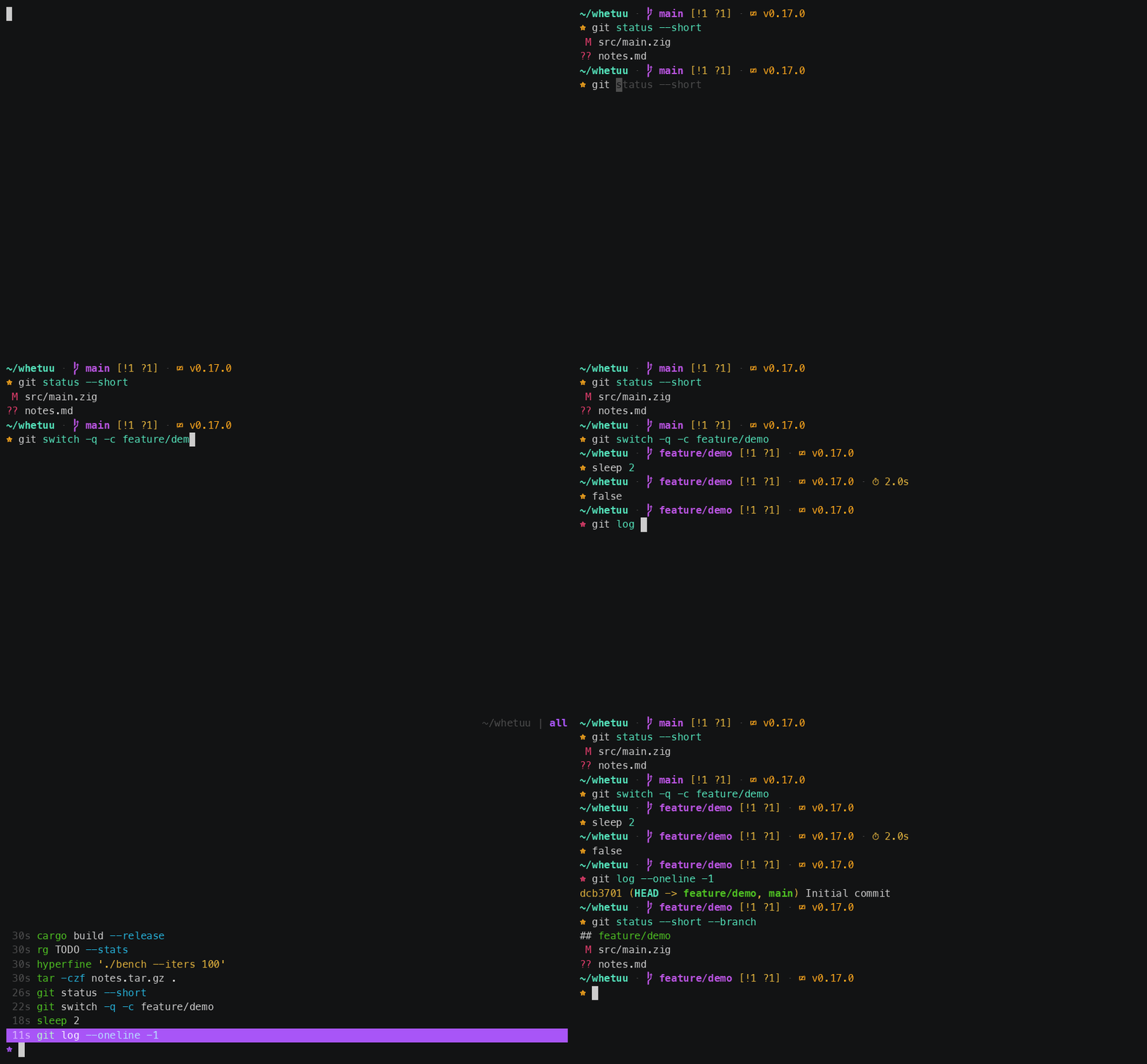
The status line tracks the branch, the git status and the toolchain version. Pressing the up arrow opens the history picker, which filters and ranks as you type and runs what you pick.
~/modules
What it shows
Left to right, each segment appears only when it is relevant.
- user_host
- user@host in bold green, but only over SSH or when you are root, and then in bold red as a warning.
- directory
- The current directory with $HOME collapsed to ~. Keeps the anchor plus as many trailing directories as fit the width.
- git branch
- Branch glyph and current branch, or (detached), in magenta.
- git state
- Any operation underway, in yellow: (rebasing 2/7), (merging), (cherry-picking). Read straight from .git, with no extra subprocess.
- git status
- Conflicts, stashes, staged, modified, untracked, ahead and behind, in one bracketed group.
- language
- Logo and toolchain version in the brand colour, for 39 languages and tools. Detected from a project manifest, a source file extension, or an infra marker.
- cmd_duration
- Timer glyph and elapsed time, when the last command ran for two seconds or more.
- update
- Cloud glyph and the tag of a newer release, once one is published, and nothing there the rest of the time. Read from a file the daily whetuu upgrade --check writes, never from the network.
- character
- A star, purple by default or in the language brand colour. Turns red after a failed command.
~/picker
A history picker on the up arrow
Commands are recorded once they finish, and only when they exited cleanly and are text, so neither typos nor an image pasted into the terminal enter the store. Each is stored with the directory it ran in. The picker opens scoped to the current directory and falls back to all history when there is none. The command that just broke is the one exception. It sits at the top in red until you run another command, so you can pick it and fix it. It is never stored.
Rows are syntax highlighted. The command name, flags, paths, variables, quoted strings and operators each take a colour from your terminal theme, so the picker matches the palette you already run. A command too wide for the window loses its middle to a … rather than its end, which keeps a run of commands sharing one long prefix apart.
The closest match comes first. The letters you type have to appear in order, not next to each other, so gcm finds git commit -m. Letters found in a run, at the start of a word, or at the front of the command are worth more than the same letters scattered through the middle, which is what puts git commit -m above git checkout main. Between two commands that fit equally well, the one you run more often and more recently wins. That is only ever a tiebreak. An empty search is not ranked at all, so the up arrow still lands on the command you just ran.
- typeFilter and rank. The letters must appear in order, ignoring case, and every word of the search must match.
- Backspace / DeleteDrop the last character of the search. The cursor never leaves the end of it, so both keys do the same thing.
- Ctrl+W / Alt+BackspaceDrop the last word of the search. A word here is what the search itself splits on, so one press takes one search word.
- Ctrl+UClear the search. The picker opens with whatever you had already typed, so this is how you start a fresh one.
- ↑ / ↓ / Ctrl+P / Ctrl+NMove the selection. Up goes further back in time.
- Home / EndJump to the newest command, or to the oldest one on the list.
- Ctrl+GSwitch between this directory's history and all of it.
- EnterRun the selection. A search that matches nothing runs as typed.
- TabPut the selection on your shell's command line without running it, to edit there with the editor you already know.
- EscCancel, leaving whatever you had typed on the command line.
~/commands
Nothing to run day to day
The shell hook drives everything and the picker is on the up arrow, so two of these are called for you and you never type them. This is the whole command surface.
| Command | Does |
|---|---|
whetuu | Print the command list. |
whetuu --version | Print the version. |
whetuu init <fish|bash|zsh> | Print the shell integration script, meant to be sourced or evaled. Prints the setup line instead when run straight into a terminal. |
whetuu render | Render one status line. Called by the shell hook, not by you. |
whetuu history | Open the interactive history picker. |
whetuu history add -- <command> | Record a finished command. Called by the shell hook. |
whetuu scrub [<text>] | Remove every stored command the secret patterns match, and every one containing the text. Prints how many went. |
whetuu scrub --dry-run [<text>] | List what scrub would remove, and change nothing. |
whetuu paths | Print where the history store and version cache live, and whether each file exists yet. |
whetuu upgrade | Replace the running binary with the newest release, and print what changed. |
whetuu upgrade --check | Say what release is waiting and what changed in it, and install nothing. Writes the tag down, which is what the status line reads. whetuu runs this for itself once a day. |
render and history add take flags that only the init scripts pass, namely exit status, duration and width. That is why they are left out here.
A fresh install has neither file. whetuu paths marks the missing one rather than hiding it, until the first command is recorded and the first toolchain version is cached. With neither $HOME nor the matching XDG variable set it says so, because then whetuu has nowhere to write.
~/performance
Renders in about 2 ms
A status line runs before every command, which makes it the one thing in your shell that has to be quick. The slowest module runs as a task via std.Io while the rest run alongside it, so a render takes about as long as its slowest probe rather than the sum of them all.
| Directory | Render | For comparison |
|---|---|---|
| No repo, no toolchain | 1.0 ms | — |
| Zig repo, 49 files | 2.8 ms | zig version alone: 3.5 ms |
| Monorepo, 10 000 files | 11.0 ms | git status alone: 10.9 ms |
Measured with hyperfine --warmup 40 --runs 400 on a 13th gen i9-13900H, --release=fast, pinned to the performance cores on an otherwise idle machine. In the monorepo the whole status line takes about as long as git status on its own.
Outside a repository neither subprocess runs. whetuu walks up from the current directory looking for the repository, which is a handful of stat calls, and only starts git once it has found one. That is what makes a directory with no repository and no project cost a millisecond.
A slow repository cannot hang your shell. Both subprocesses are bounded. Git gets 250 ms and the toolchain probe gets 200 ms, and they run at the same time, so the worst case is the larger of the two. Given a git that hangs for 30 seconds, the status line still returns in 257 ms. It simply drops the git segment.
And a status line stays out of git's way. The call passes --no-optional-locks, so git reads the index without refreshing it. It never takes index.lock, which a git commit in another terminal would then fail to take.
A big history does not slow the picker. The up arrow reads the most recent few megabytes rather than the whole store, so it opens in about 20 ms on a store of 70 MB just as it does on one of 400 KB. Nothing is deleted to keep it that way. Years of history stay on disk.
Nor does it slow the search. A keystroke costs 1 to 3 ms against a full window of about 50 000 commands, roughly a fifth of what the same code costs scoring one command at a time. Commands are scored several at a time with the vector instructions the processor already has, and most of a store is ruled out by which characters a command contains before any of it is scored at all.
~/security
Your commands never leave your machine
A status line sees every command you run, and the picker keeps them. That is a lot to hand a small tool, so here is exactly what whetuu does and does not do.
- The network, in full
- Every request is a GET over TLS of a URL anyone can open in a browser. whetuu upgrade makes three: the newest release tag from api.github.com, the tarball and its SHA256SUMS from github.com, which it verifies before writing anything, and CHANGELOG.md from raw.githubusercontent.com to print what changed. whetuu upgrade --check makes the first and the last, and writes the tag to a file, which is how the status line knows to show one — and whetuu starts that check for itself at most once a day. That is all of it: no telemetry, no sync, no account, no server. The requests carry a user agent of whetuu/<version> and nothing else about you or your machine.
- Four files
- Running, whetuu writes exactly four. The history store, created with mode 600 and reset to it on every write, so one left readable by an older version corrects itself. A cache of toolchain version strings at ~/.cache/whetuu/versions. ~/.cache/whetuu/release, one line holding the newest release tag and when it was looked up. And ~/.cache/whetuu/scrubbed, the version that last removed stored secrets. Delete any of them whenever you like.
- Spec paths only
- The binary goes in ~/.local/bin, the history store under $XDG_DATA_HOME and the version cache under $XDG_CACHE_HOME. No directory of our own in your $HOME. whetuu paths prints both data locations.
- One install edit
- The installer appends the init line to the config of the shell in $SHELL, and nothing else. Not the config of a shell you do not use, and never twice. A PATH line joins it only when ~/.local/bin is not already on your PATH. WHETUU_NO_MODIFY=1 makes it print them instead.
- Skip a command
- Start a command with a space and it is never recorded. A command holding a token, a password in a URL or a literal
TOKEN=…is skipped too, and each new version removes any it finds already stored. Only successful commands are stored at all. - No shell, ever
- whetuu runs three subprocesses: git and the toolchain version probe, neither outside a repository or a project, and once a day itself as whetuu upgrade --check, detached with every stream on /dev/null. Each gets a fixed list of arguments rather than a command line, so nothing you type is ever interpreted as a command. State like a rebase in progress is read straight out of .git with no subprocess at all.
- Escapes defanged
- Every control byte in a command, a branch name or a directory becomes a ? before it reaches your terminal. A repository you just cloned cannot repaint your screen or move your cursor through whetuu.
- Nothing to configure
- No config file means no config parser, no theme format and nothing of yours being executed at startup. The attack surface is the binary and the two commands above.
- One caveat
- The language module picks which toolchain to probe from the files in the current directory, so entering an untrusted repository can make whetuu run something like node --version. It runs whatever your PATH resolves, never a binary from the repository.
- Checkable downloads
- The Linux builds are static musl with no runtime dependencies, and every release ships a SHA256SUMS file. The source is on GitHub and builds from it with one command.